
Step 1: Select an online screening platform
There are more options than ever for hosting a virtual film screening. For WLP's screenings, we use two hosting platforms, Zoom and MyCircle.tv. Zoom is convenient and easy to use for hosting conversations, but some viewers may have connectivity issues that disrupt the video streaming. MyCircle.tv can serve as a backup for providing consistent HD viewing where connectivity is less robust.
- Zoom allows you to use the screen share option to stream films for all participants. Some helpful tips include:
- To make sure you have sound, select "Share computer sound" when you enable your screen share.
- To avoid sharing your entire screen, which may include pop-up messages or other content you do not want to make part of the screening, choose the correct screen share option. When you select screen share in Zoom, you will be prompted to choose a share option. These will include sharing your entire screen or sharing a specific program.
- To assist with addressing technical issues and hosting the conversation, it is helpful to have a co-host to share these responsibilities.
- MyCircle.tv allows for synchronized film viewing in HD. However, it does not allow you to host a video discussion prior to and after the screening. To work around this, you will have to direct your viewers away from your Zoom meeting to link to the screening, and then direct them back after the screening. For this reason, WLP uses MyCircle.tv as a backup option for anyone experiencing technical or connectivity difficulties with the Zoom screen share.
Helpful factors to consider when choosing your platform
- Do participants have a strong internet connection?
- Having back-up viewing options is ideal for groups with varying internet connectivity.
- Does the host have a strong internet connection?
- If the host does not have a strong internet connection, screen sharing on Zoom is not ideal.
- Do you want participants to watch the video simultaneously?
- If so, you will not want to direct participants to watch on video platforms where they control the start and stop times, or can stop the video midway. On MyCircle.tv the host controls the viewing start time. If a participant joins late or pauses during viewing, once they hit play, their viewing will adjust to the same point as the rest of the group.
Step 2: Sending invitations
It is important to email your event invitations at least one week in advance so that your invitees have time to arrange their schedules. Send a second email invitation/announcement a day or two before the event as well, to serve as a reminder. Below is an example of an email invitation to the screening that you can edit to fit your circumstances. If you would like to post your screening on social media, please feel free to use our promotional poster graphic. You can edit this to add information about your event and your organization.
Dear [NAME],
We hope that you can join us on [DATE + TIME] for a film screening and discussion about Women Learning Partnership’s new documentary, It’s Up to Us. This 30-minute film explores solutions to the interconnected threats to human security, including conflict, climate change, economic inequality, discriminatory family laws, and gender inequality.
We want to hear your thoughts about the film and your ideas about the important and timely issues it raises. Following the screening, [NAME OF ORGANIZER] will host a conversation about the film.
Please RSVP by replying to this email and we will send you a link to the film and follow-up conversation.
In solidarity,
[NAME OF ORGANIZER]
Step 3: Developing an agenda
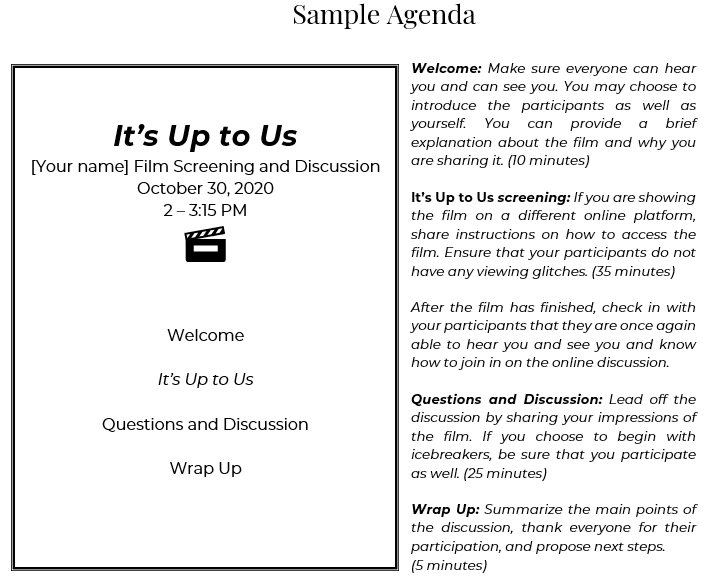
Depending on the size of your viewing audience, it may be helpful to share an agenda for the screening. The agenda can be emailed to participants, along with a reminder about the upcoming screening, a day or two before the event or shared on the day of the event.
Step 4: Facilitate a conversation about the issues raised in the film
Below are some suggested icebreakers and questions that may help you facilitate a discussion after the film. Welcoming and non-judgmental facilitation will encourage greater participation. If the group is large, or its participants are not well-known to each other, it can be useful to set time limits on responses. Suggest to participants that they keep their answers brief, about a minute or so in length so that the group hears from as many participants as possible. Depending on the number of participants in the screening, how well they know each other, and their prior familiarity with the issues raised in the film, an icebreaker exercise may or may not be appropriate. For more extensive guidelines on facilitating, click here to read or download, “Communicating in a Workshop Setting,” excerpted from WLP’s training manual, Leading to Choices.
Icebreakers
If your group is relatively small, with approximately 12 or fewer people, you may wish to start with “icebreakers” to get the conversation started. Here are some examples:
- Share your name and three words that best describe how the film made you feel.
- Share your name, and in one sentence, describe which issue raised in the film is most important to you.
- Share your name and the issue or concern that you feel is most pressing at this moment for you, your family, and colleagues, and how it relates to the film.
Discussion Questions
- What does human security mean to you? What are its components?
- What does the film’s title, “It’s Up to Us” mean to you? What is the “It” in the title? Who is the “us” in the title?
- What are the connections between droughts, hunger, political oppression, war, and mass emigration? What do these crises have in common?
- What does the COVID-19 pandemic share with other human disasters in current times and in the past? What makes it different?
- How can families, communities, and government better include women in helping to solve the problems women are facing?
- What are some perspectives, characteristics, and strengths of the women you know that you think are valuable for solving problems in society?
- What are some of the barriers holding women back from greater participation in decision-making at the local and global levels?
- What are some of the barriers holding you back from greater participation in influencing decision-makers?
- What step or action would you consider taking to help others facing great challenges?
Step 5: Ending the Event
At the conclusion of your event, it can be helpful to summarize some of the key ideas that arose during the discussion. This is something that the host/facilitator can do, or you can plan for another participant to do it. If one of your objectives is to build a network of activists, you may wish to ask participants to suggest next steps for themselves and the group.
After thanking everyone, you may wish to ask participants to send you feedback via email or a survey.
Your concluding remarks can include information about projects you and/or your organization are working on, links to or information about other activities, and next steps!